 Localino
More than text over Meshtastic and MeshCore
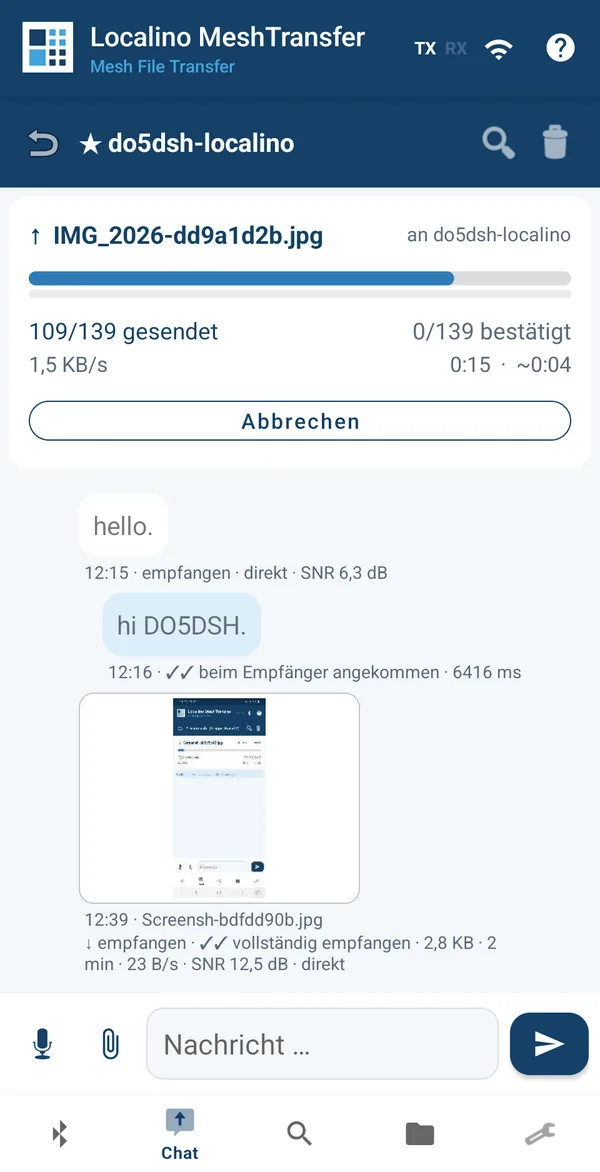
Send files, images and voice messages over your LoRa radio: MeshTransfer for Meshtastic, MeshCransfer for MeshCore. The Localino Mailbox stays next to the radio and keeps everything that arrives while your phone is away - on either network.
The apps · Which app do I need? · The Mailbox
Meshtastic and MeshCore connect people over LoRa radio, kilometres apart and without mobile network or internet. Both are excellent for short text messages. A photo from the scene, a site plan or a spoken message does not fit: a LoRa packet holds only a few hundred bytes, and packets can be lost at any time.
Two parts close that gap. The Localino app carries files reliably across the mesh as MeshTransfer on Meshtastic or MeshCransfer on MeshCore. The Localino Mailbox makes sure nothing is missed when your phone is not connected.
Do I need both? No, you can start with the app and work with your existing Meshtastic or MeshCore hardware. But the Mailbox makes sure you can receive files even when you are not connected to your radio.
One protocol, two networks
Pick the app that matches the firmware on your radio. Meshtastic and MeshCore cannot talk to each other over the air.
The app you use for text messages today tells you which one you need: the Meshtastic app means MeshTransfer, the MeshCore app means MeshCransfer. Both can be installed side by side, one licence covers both, and the Mailbox serves either. Compare the two apps
How it fits together
Your radio stays where reception is best. The Mailbox sits next to it; your phone reaches both over Wi-Fi.
What it adds to Meshtastic and MeshCore
Files, images, voice
Files up to 100 KB with a licence, and voice messages with the Codec2 speech codec: thirty seconds of speech come to between 6 and 18 KB.
Arrives complete
Both apps split, code and check every transfer. The receiver confirms a file only once the checksum over the whole file matches. Broken transfers resume instead of restarting.
Kind to the mesh
Compression, larger packets and fewer acknowledgements save air time for everyone. The apps keep track of their own air time and observe the 10 % duty cycle.
Nothing missed
With the Mailbox, every message and every broadcast file is stored while your phone is away and delivered the next time it connects.
Downloads
Start with the app for your network. Add the Mailbox when your radio should keep watch around the clock.
MeshTransfer app
- Android 8 or later
- free to try; a licence unlocks full size and speed
- works with any Meshtastic radio over Bluetooth, USB or Wi-Fi
MeshCransfer app
- Android 8 or later
- free to try; the same licence as MeshTransfer
- works with MeshCore companion radios over Bluetooth, USB or Wi-Fi
Localino Mailbox
- free firmware, no licence needed
- for the ESP32-CAM: low cost, with microSD slot
- connects to the radio by cable, Wi-Fi or Bluetooth (UART / Wi-Fi recommended)
App and Mailbox together
MeshTransfer and MeshCransfer bring files reliably over radio, on Meshtastic and on MeshCore. The Mailbox makes sure they arrive even when your phone is not there. Together they turn your radio into a station that never sleeps.
MeshTransfer, MeshCransfer and the Localino Mailbox by Localino 2026. Meshtastic® is a registered trademark of Meshtastic LLC. MeshCore is an independent open-source project. MeshTransfer, MeshCransfer and the Localino Mailbox are independent products and not affiliated with Meshtastic LLC or the MeshCore project.