 Localino MeshTransfer
The MeshTransfer Mailbox
Your radio takes in everything, even while your phone is away. The Mailbox keeps every message and every file and hands them over the moment you are back.
See how it works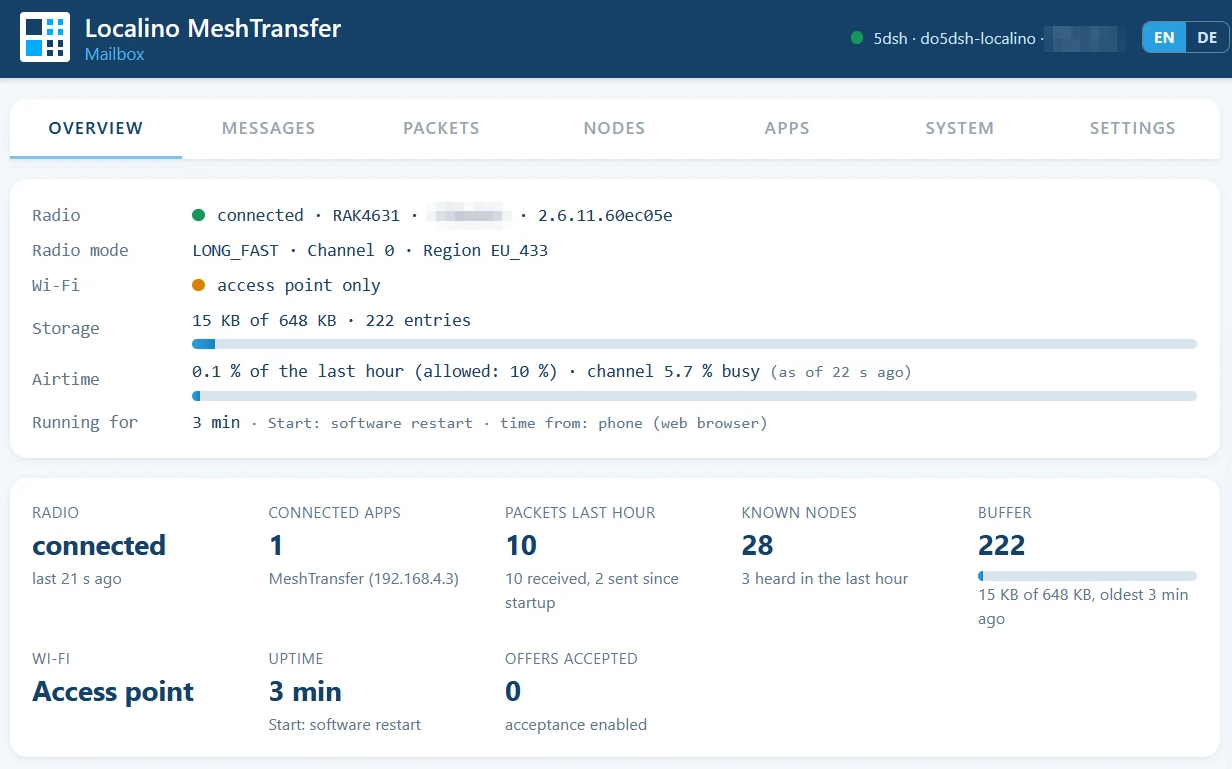
Meshtastic works without the internet, but only while a phone is connected to the radio. When the phone is out of the house, switched off or out of battery, the radio keeps only a little, and files offered to you are never sent at all, because nobody is there to accept them.
The Mailbox closes that gap. It is a small ESP32 board that stays next to your radio, writes every packet it receives to its own flash storage, and delivers it to your apps the next time they connect.
How the Mailbox fits in
The Mailbox is not an app. It is firmware on a small ESP32 board that sits next to your radio and connects it to your Wi-Fi.
- ✓Towards the radio: one steady connection. By cable (recommended), over Wi-Fi or over Bluetooth – you choose one. The Mailbox holds this connection around the clock and stores everything the radio receives.
- ✓Towards your apps: Wi-Fi. The MeshTransfer app, the Meshtastic app and your web browser connect to the Mailbox over Wi-Fi, not to the radio. To the apps the Mailbox looks like a Meshtastic radio in your network, so nothing in the apps has to change.
- ✓Your phone stays free. It only needs to be in the same Wi-Fi when you want to read or send. Whatever arrives in between waits in the Mailbox.
| Connection to the radio | Good for | Set up in |
|---|---|---|
| Cable (UART) | a fixed station; the most robust and fastest connection, three wires | guide, step 3 |
| Wi-Fi (TCP) | a radio that already sits in your Wi-Fi, e.g. a Heltec V3 | guide, step 5 |
| Bluetooth | a radio without Wi-Fi and without cable, e.g. a RAK4631. The radio accepts only one Bluetooth connection, the Mailbox's (note: BLE+Wi-Fi in parallel is sometimes unstable in ESP32) | guide, step 5 |
One night at the Mailbox
Your phone charges in the kitchen with Wi-Fi off. The radio and the Mailbox stay on duty.
- Bernd: "Good night from the ridge"
Stored in the Mailbox. Without it, the message would wait only in the radio's small memory.
- Anna offers summit-view.jpg as a broadcast
No phone is there to answer, so the Mailbox accepts the offer. All 121 packets are stored as they arrive.
- Bernd: "Battery at 60 %, all fine"
Stored, marked not fetched until an app picks it up.
- Your phone is back in the Wi-Fi
The Meshtastic app and MeshTransfer receive everything since last night. MeshTransfer assembles the image. Each message now shows ✓ MeshTransfer 07:12
How it works
Three parts: the radio you already have, the Mailbox next to it, and your phone anywhere in the house.
Connected to your radio
By cable, over Wi-Fi or over Bluetooth. The Mailbox signs in to the radio like an app does and keeps that connection open around the clock.
Stored for good
Every packet goes into flash storage, numbered and unchanged. A power cut loses nothing. When the storage is full, the oldest part makes room for new packets.
Delivered when you are back
Your apps connect to the Mailbox's address as if it were the radio. Each app receives everything since its own last visit. Whatever you send goes straight through to the radio.
Files arrive without your phone
A file sent as a broadcast needs someone to say yes before it goes out.
- ✓The Mailbox says yes for you
When MeshTransfer is not connected, the Mailbox answers broadcast offers addressed to you, so the sender starts the transfer. - ✓Every packet is kept
The data packets, including the extra coded ones, are stored like everything else. - ✓Assembled on your phone
MeshTransfer receives the packets later and rebuilds the file, verified by checksum as always.
Everything visible in your browser
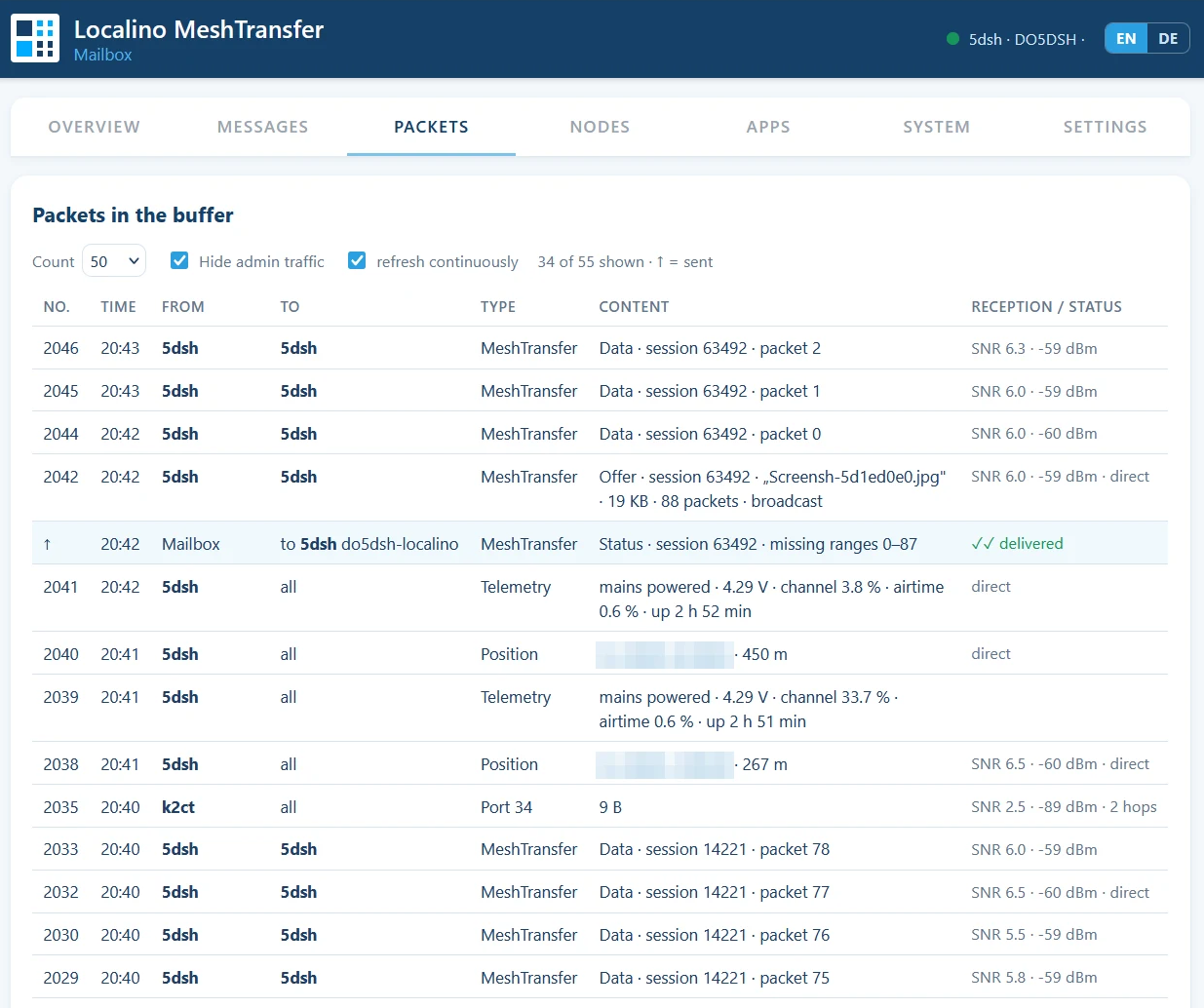
The Mailbox has its own web interface, opened in any browser in your network. It shows what has arrived, what was sent, which files are on their way and which nodes were heard, together with radio mode and air time.
Every message carries a mark: ✓ MeshTransfer 19:12 tells you which app fetched it and when, not fetched means it is still waiting.
Long lists show 100 entries a page. Lists can be cleared, and entries are deleted after 30 days, or whatever period you choose. The interface is in English or German.
Without and with the Mailbox
| When | Without the Mailbox | With the Mailbox |
|---|---|---|
| Your phone is out of the house | only what fits in the radio's memory | every message is kept |
| Someone offers you a file as a broadcast | not sent, nobody accepts | accepted and stored |
| Your phone comes home | whatever the radio still holds | everything since your last visit |
| Power cut | stored messages can be gone | storage survives |
| Meshtastic app and MeshTransfer | one app at a time | both, each where it left off |
Fits your station
Put the radio where reception is best. The Mailbox sits next to it; your phone reaches both over Wi-Fi.
| Connection to the radio | Good for |
|---|---|
| Cable (UART) | a fixed station (first choice) |
| Wi-Fi | a radio that already sits in your network (second choice) |
| Bluetooth | no cable and no Wi-Fi on the radio |
Your data stays at home
The Mailbox works only inside your own network. No account, no server, nothing goes to the internet. The web interface is protected by a password, and stored entries are deleted automatically after the period you set. Without a home network the Mailbox opens its own access point for setup.
Requirements
Mailbox
An ESP32-CAM with the Mailbox firmware, powered over USB with 5 V and at least 1 A. Support for the ESP32-S3-DevKitC-1 with more memory is planned.
Radio
A LoRa device with Meshtastic firmware 2.5 or later, for example a Heltec V3.
Apps
In the Meshtastic app add a network device with the Mailbox's address. In MeshTransfer choose Wi-Fi with the same address.
Step by step, from flashing to the first message: the setup guide.
Mailbox and app together
MeshTransfer brings files reliably over radio. The Mailbox makes sure they arrive even when your phone is not there. Together they turn your radio into a station that never sleeps. The Mailbox firmware is free and needs no licence; the licence only extends the app.
Download the appMeshTransfer and MeshTransfer Mailbox by Localino 2026. Meshtastic® is a registered trademark of Meshtastic LLC; the MeshTransfer Mailbox is an independent product and not affiliated with Meshtastic LLC.